
How to Redeem Anime Dimensions Simulator Codes
Level 10 gate, left HUD path, VIP-server note, and what each error toast usually means.
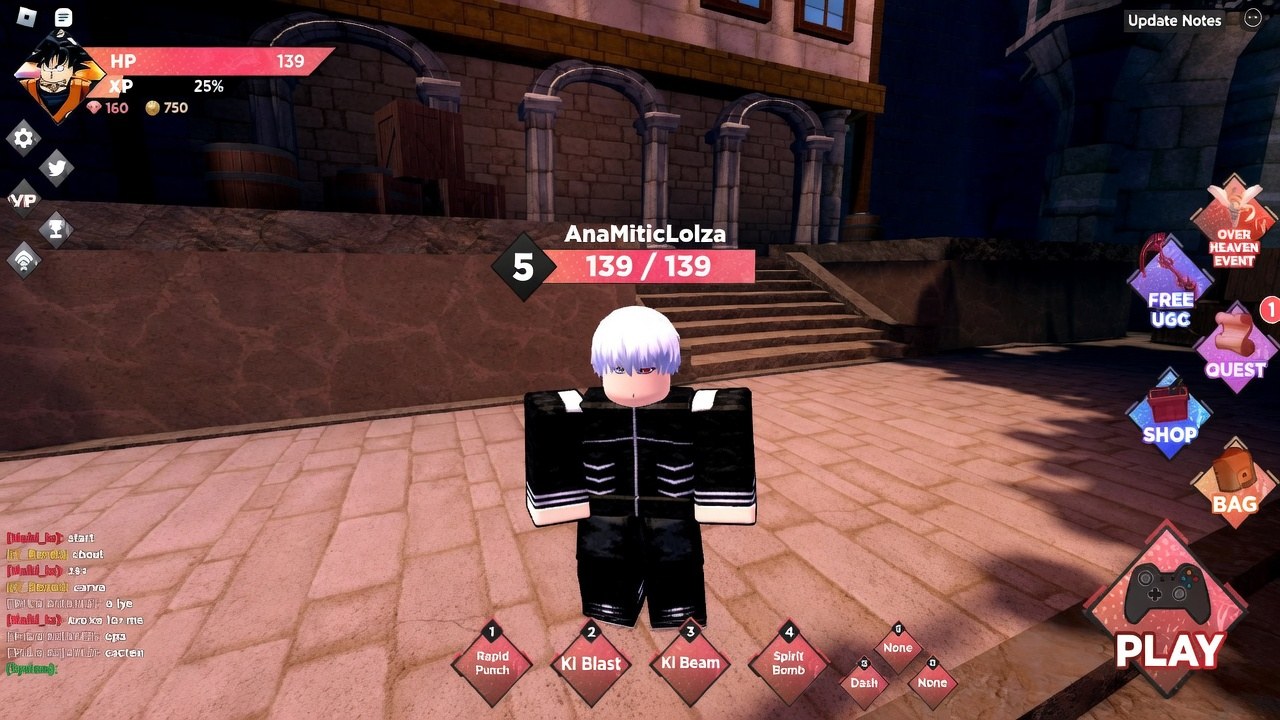
Redeeming codes in Anime Dimensions Simulator is a HUD task, not a Roblox website task. You join the experience, wait until your account is level 10, open the CODES panel on the left side of the lobby, paste a live string, and press Go. That is the entire loop. The rest of this page is the click path, the mistakes that burn a working code, and the toasts that look like failures when the real problem is the server you loaded.
The live list sits on the codes hub. Dead strings sit on expired codes. If you have not unlocked the button yet, stay in early dimensions with the getting started route until level 10, then come back here for a two-minute redeem pass.
Unlock the CODES button at level 10
Albatross Games gates promo codes behind account level, not behind a game pass. Until you hit level 10, the left HUD either hides the button or shows it in a locked state. There is no workaround, no Discord role, and no VIP-only bypass for the level check. Play the first dimensions, clear waves, and let EXP land. Controls for movement, skills, and targeting are on controls if the lobby still feels awkward.
Raids unlock later at level 15 and Infinite Mode at level 20. You do not need those modes to redeem. You only need a loaded lobby, a selected character, and the level 10 flag on the account.
Click path on PC and mobile
- Open Roblox and join Anime Dimensions Simulator. Wait until the lobby HUD finishes drawing. A half-loaded session will swallow the first paste.
- Pick a character if the game asks. Codes credit the account, not a single unit, but the HUD is easier to tap after a character is selected.
- Look at the left HUD. Current builds label the slot CODES. Older guides called the same slot a Twitter bird under the nameplate. Both descriptions point at one button.
- Tap it. A text field appears. On phones the keyboard can cover Go; scroll the panel so both the box and the button stay visible.
- Paste one code. Do not chain several strings in the same box.
- Press Go. Wait for a toast. Then paste the next code from the codes hub.
Copy from the wiki instead of typing. Live strings mix letters and digits on purpose: 2ESP2E5R, DIME2NSI2ON4, M2OC2HI0. A hand-typed O instead of 0 fails even when the rest is perfect.
Case, spaces, and paste junk
Treat every code as case-sensitive even if a fan wiki once said otherwise. Paste the exact block. Strip a trailing space if your keyboard inserted one. Do not wrap the string in quotes. Do not add a hashtag. Do not translate a code into lowercase to make it “look nicer.”
If you paste from a screenshot, watch for line breaks. A hidden newline in the box is enough for Go to treat a live code as invalid.
VIP servers after a patch
Some older descriptions told players to redeem on a VIP server so the newest codes would work. That advice is optional, not a rule. Public servers redeem the same catalog once they have restarted onto the current build. Use a VIP server when:
- The public lobby is full and you cannot join.
- You just watched a code drop on @coolbullsAS and your public server still shows a pre-patch description.
- The codes UI itself errors or never opens.
If the public server is healthy, redeem there. You do not spend Robux to claim DEATH or MINIUPDATE.
What the error toasts usually mean
The game is terse. Read the toast, then pick the matching fix instead of hammering Go.
- Invalid / does not exist. Typo, extra space, or a string that was never a code. Compare it to the codes hub character by character.
- Expired. The code retired. Check expired codes and stop retrying it on alts; expiry is account-wide for that string.
- Already redeemed. This account already claimed it. Codes are once per Roblox user, not once per character.
- Level too low / locked. You are under level 10. Leave the panel and grind.
- Blank toast, freeze, or timeout. The lobby did not finish loading, or the remote failed. Rejoin, wait for the HUD, and try once more.
After a named update, retry in this order: rejoin the same server, hop to a fresh public server, then try VIP if the UI still looks like the old build. Do not sit in one frozen lobby for twenty minutes hoping the catalog hot-reloads.
After a successful redeem
Gems and raid tokens credit immediately. Boost timers start when the toast lands, so walk into a dimension instead of standing in the shop. Spend gems in the character shop; spend raid tokens in the raid shop once you are level 15. If a code grants all boosts, that is the moment to run your current best dimension, not to AFK in the Time Chamber with the timer wasting on an empty room.
When every live string is claimed, leave the panel. New codes show up on the Albatross Games Discord and on Twitter, and they get copied onto the codes hub after the next check.
Frequently Asked Questions
Quick answers for codes, raids, gems, and character picks.
Where is the codes button?
On the left HUD after you load into the lobby. Current builds label it **CODES**. Older guides called the same slot the Twitter bird under the nameplate.
Do I need a VIP server to redeem?
No. VIP is optional when a public server is full or still running a pre-patch build. Healthy public lobbies redeem the same live list.
Why does Go say the code is invalid?
Usually a typo, a hidden space, or an expired string. Paste from the codes hub, then compare failures against expired codes.
Can I redeem the same code on two characters?
No. Codes are once per Roblox account. Switching units in the lobby will not reset the claim.
The CODES button is missing. What now?
You are under level 10, or the HUD has not finished loading. Follow getting started, then rejoin if the left bar is still empty.
Should I retry a code after an update?
Yes, once, on a freshly joined server. If the toast still says expired, it is dead. If the UI looks old, hop or use VIP, then stop after a second failure.