
Anime Dimensions Simulator Controls
WASD, skills 1–4, dash, and the hub HUD: CODES, BAG, PLAY, Raid Shop, Boss Rush, AFK.
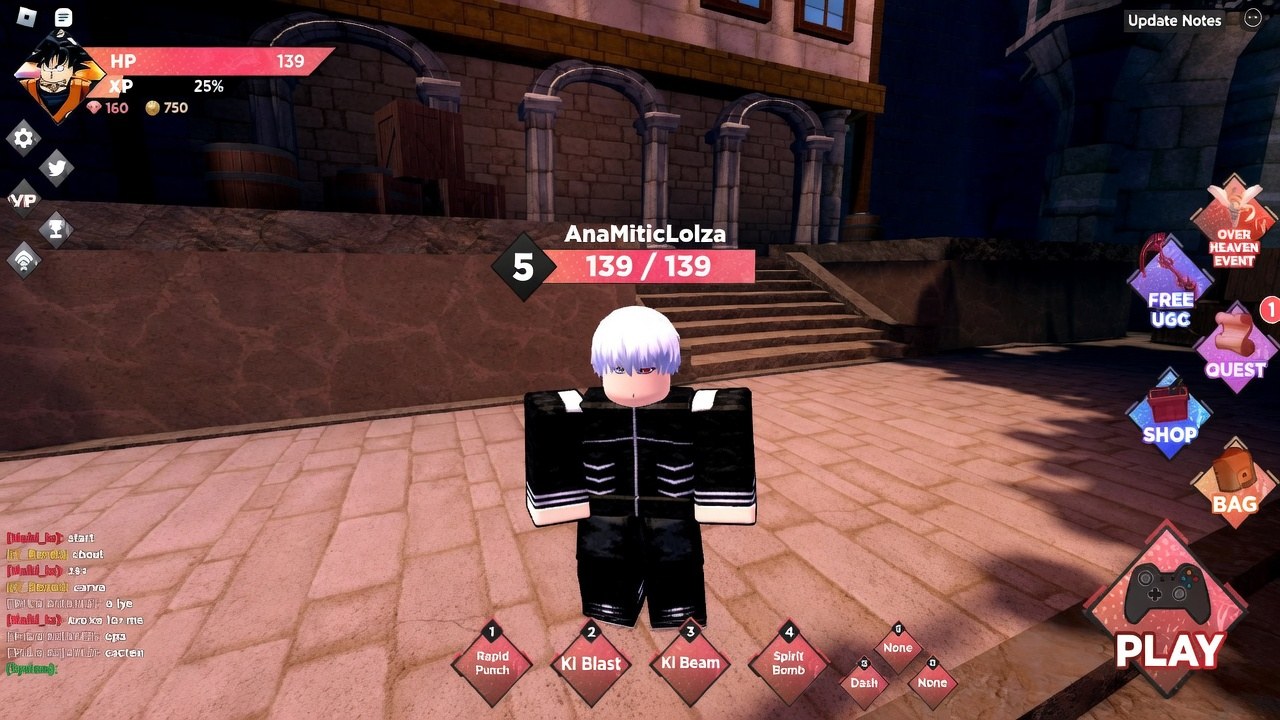
Anime Dimensions Simulator plays like a typical Roblox fighter once you leave the hub. You move, auto-attack, dump four skills plus an awakening, dash out of telegraphs, and swap menus with HUD icons that do not look like every other anime game on the platform. This page is the control and HUD map for PC, mobile, and console. It is not a combo list. Kit-specific timings live on character pages under the players hub. The game is free on Roblox, online co-op, shipped 11 June 2021 by Albatross Games. Nothing here requires a game pass.
If you have not cleared Dimension 1 yet, keep this tab next to the getting started walkthrough. If you are looking for auto-farm macros, that is a different (and account-risk) conversation on how to execute scripts; this page only documents the real buttons.
PC, mobile, and console
On PC, WASD moves. The mouse aims the camera. Left click is the basic attack (M1). Number keys 1–4 fire the equipped character’s skills. Awakening has its own key or on-screen button once the character has one unlocked. Q is dash on keyboard; some players rebind it, but the default is Q. Space jumps. Jump slightly before dash if you want the longer “super dash” used to cross tiles in Dimensions. Shift lock is optional. Turn it off if you are recording a click loop for AFK raids, because a locked mouse will walk your cursor off the PLAY button.
On mobile, a left virtual stick moves. Skills are on-screen buttons along the right. Dash is a labeled button, not a hidden swipe. The HUD icons (CODES, BAG, PLAY) are the same art as PC, just scaled. Use two thumbs: one on the stick, one on 1–4. Do not cover dash with the skill cluster; you will eat raid slams you could have sidestepped.
On console, left stick moves, face buttons or bumpers map to skills depending on the Roblox gamepad template, and the right stick is camera. If a skill does not fire, open Roblox’s experience controls overlay and check which face button landed on slot 1. Console players still use the same hub icons; there is no separate console-only Raid Shop.
Ping matters. A 100-plus ms server makes dash look like it whiffed when you actually dodged a frame late. If raids feel unfair, glance at the Roblox server ping before you reroll traits. Dodge is dash plus camera, not a dedicated i-frame key. Some skills list invincibility on their tooltip; most M1s do not.
Combat: skills, dash, and camera
Every character has an M1 string and four skills. Powerful area skills have long cooldowns; fillers come back quickly. Raid DPS is a full eight-minute rotation, so hold a cooldown if the boss is about to become hittable rather than dumping 4 into a whiff. Assists, if equipped, have their own cooldown and can be fired from the assist button without swapping the main character.
Dash is your panic button and your gap closer. Default Q on PC, on-screen Dash on mobile. Super dash (jump then dash) covers more tiles and is worth practicing in Dimension 1 before you take it into a timed raid. You cannot dash through every attack; you can dash out of most ground slams if you are not already in a long skill animation. Canceling a skill with dash is character-dependent. If a skill locks you in place, treat it as a commitment, not a cancel.
Camera should sit slightly above and behind so you can see raid telegraphs. First-person is a novelty and a way to miss AoE. On mobile, pinch to zoom out until the boss’s feet and your character are both on screen. In the hub, camera does not matter; in PLAY, it does.
Practice mode exists in the hub for testing a new character without burning a Dimension. Use it when you swap off a starter so 1–4 are not a surprise in a live raid.
Hub HUD and landmarks
The hub is a menu world. Learn the icons before you need them in a hurry.
- CODES: left side of the HUD. Locked until account level 10. Opens a text box; paste a string and press Go. Case-sensitive. Step-by-step sits on how to redeem codes.
- BAG: inventory. Characters, cards, pets, accessories. Open a character here to see Change Trait on the left. Trait rolls cost 50 raid tokens or 100 trait tokens. You cannot grind traits inside Infinite, raids, Dimensions, or Boss Rush; you only spend those currencies here.
- PLAY: Dimension select. This is how you leave the hub for XP and cards.
- Raid Shop: token sink. Unlocks in practice once you have tokens from level 15 raids. Do not buy gold.
- Boss Rush: chained bosses, one free daily, tickets for extra runs.
- AFK Place: idle room. Double rewards on weekends after the 24 July 2026 mini update.
- VIP: only if you own the pass. Decal plus AFK gem multiplier, not a control.
Raids have their own create/join UI (party 1–8, eight-minute timer). Creating a friends-only raid so the boss walks toward you is a common AFK setup; you still have to press the in-raid skill buttons or you deal nothing. Full raid rules are on the raids guide.
Traits, ping, and common mistakes
Change Trait is BAG → character icon → Change Trait. 50 raid tokens or 100 trait tokens per roll. Odds run from Common (~45.4 percent) down to Divine (~0.1 percent). Do not blow tokens here on a starter you are about to replace. Do not confuse this menu with the gem shop.
Common mistakes: looking for CODES on the right (it is on the left); standing in the hub with a 2x EXP code ticking; never clicking Start when a co-op partner joins your Dimension; buying gold in Raid Shop because the button is next to pets; treating dash as a heal. Another one: assuming there is a Trello that documents every keybind. There is not. If a mini update moves an icon, walk the hub once and update your muscle memory.
If a skill button does nothing, you are either on cooldown, in a hitstun, or in the hub. Skills do not fire in the hub. Go through PLAY or into a raid lobby. If dash does nothing, you are in an animation or you rebound Q and forgot. If CODES does nothing, you are under level 10.
Learn the HUD in the hub, then fight. The buttons do not change when the Dimension theme does. Nardo’s map still uses 1–4 and Q. Fluffy’s map still uses PLAY to enter. Once those are automatic, spend your attention on the raid rotation and on not wasting gems, not on hunting the codes button.
Frequently Asked Questions
Quick answers for codes, raids, gems, and character picks.
Where is the Codes button?
Left side of the HUD, unlocked at level 10. Paste a string and press Go. Full clicks are on how to redeem.
How do I change a trait?
Open BAG, select the character, press Change Trait on the left. Each roll costs 50 raid tokens or 100 trait tokens.
What is the dash key?
Q on PC by default, a Dash button on mobile. Jump then dash for a longer super dash. Dash is your dodge; there is no separate i-frame key.
Do mobile and console use different menus?
No. PLAY, BAG, Raid Shop, Boss Rush, and AFK Place are the same hub icons. Only movement and skill inputs change.
Why won’t my skills fire in the hub?
Combat skills only work in Dimensions, raids, Boss Rush, and practice. Use PLAY to leave the hub. See Getting Started if you cannot find PLAY.